
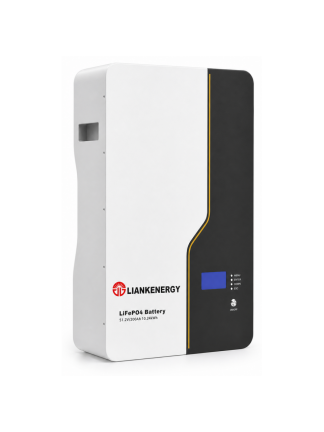
LIANKENERGY 51.2V 200Ah LiFePO4 battery. Model-specific test limits must come from the current product manual.
Your battery still shows a normal voltage, but the backup time is shorter than it used to be. Is the battery ageing, is one cell reaching its limit early, or is the inverter simply stopping discharge too soon?
Do not decide from one voltage reading. Start with the battery’s physical condition, then check the BMS, watch what happens under a known load, and measure usable capacity if the decision matters. This sequence helps you separate a battery fault from a settings, cable or measurement problem before you replace a serviceable pack.
Safety note: A stationary storage battery can deliver dangerous fault current even when its voltage appears normal. Follow the product manual, isolate all charge sources and loads before inspection, use suitable protective equipment, and keep the BMS active. Do not open a sealed pack or bypass a protection device. High-voltage or damaged systems should be handled by qualified personnel.
What Battery Health Actually Means
State of charge and state of health answer different questions.
- State of charge (SOC) estimates how much charge is available now.
- State of health (SOH) describes how the battery’s present capability compares with its specified or new condition.
Health includes more than remaining amp-hours. The battery also has to carry the required load without excessive voltage sag, abnormal heat, repeated BMS trips or one weak cell reaching a protection limit first.
Start with the checks that do not require a full discharge. If those results do not explain the problem, move to a controlled load or capacity test.
1. Is the battery physically safe to test?
2. Does the BMS show a repeatable fault or an outlying cell?
3. Does the pack remain stable under a known load?
4. How much usable capacity can it deliver under controlled conditions?
The capacity test gives the strongest answer about lost runtime. The earlier checks tell you whether the pack is safe and whether another part of the system may be causing the complaint.
|
Check |
What it can tell you |
What it cannot prove |
|
Visual and temperature check |
Whether routine testing should stop for safety reasons |
Remaining capacity |
|
BMS review |
Which cell or protection event is limiting operation |
That the displayed SOH or SOC is correct |
|
Resting and loaded voltage |
Whether the pack and connections behave abnormally |
Usable capacity from one reading |
|
Controlled capacity test |
Delivered Ah and Wh under stated conditions |
Performance under different temperatures, loads or endpoints |
How to Check LiFePO4 Battery Health
Tools and Records to Prepare
Use equipment rated for the battery voltage and expected current. You do not need every instrument for the first inspection. For a complete diagnosis, prepare:
- the current product manual and specification sheet;
- the battery’s installation and commissioning record;
- access to BMS data through the approved display, application or communication interface;
- a calibrated multimeter with adequately rated leads;
- a DC clamp meter or a correctly installed shunt-based battery monitor;
- a controlled DC load or battery analyser suitable for the pack;
- a temperature measurement device; and
- a test sheet for voltage, current, time, amp-hours, watt-hours, cell spread, alarms and temperature.
Before comparing results, record the battery model, serial number, rated capacity, nominal voltage, age, cycle or energy-throughput history if available, ambient temperature, charge settings and normal load. Without those conditions, a capacity percentage is just a number. You cannot repeat it or compare it fairly with the next test.
Step 1: Stop If the Battery Is Not Safe to Test
Inspect the enclosure, terminals, cables, protection devices and installation area before connecting test equipment.
Do not continue a routine health test if you find:
- swelling, deformation, cracks, leakage or impact damage;
- an unusual smell, smoke or discoloration;
- a hot enclosure or a rapid unexplained temperature rise;
- loose, corroded or heat-damaged terminals;
- water ingress or damaged insulation; or
- repeated protection trips with no known operating cause.
Isolate the system according to the manufacturer’s procedure and escalate the finding. A capacity test deliberately moves energy through the battery, so it is the wrong next step for a physically damaged or thermally abnormal pack.
Step 2: Confirm the Test Conditions and Product Limits
Read the battery label and current manual. Write down the rated capacity, permitted charge and discharge current, charge profile, low-voltage limit, temperature range and any required communication settings.
Do not use a generic LiFePO4 voltage from another brand as the cutoff for your test. Pack architecture, BMS settings, cell configuration and system reserve can differ. The correct boundary is the one approved for the battery being tested.
Also check the inverter, charger or energy-management settings. A healthy battery can appear weak if the system stops discharge early, limits power, uses the wrong chemistry profile or reports an unsynchronised SOC value.
What the LIANKENERGY Brochure Can Confirm
The current LIANKENERGY brochure gives useful model-level baselines, but only when the nameplate and model match. The examples below are taken from the E-STONE family; they are not universal limits for every LIANKENERGY battery.
|
Brochure model |
Cell chemistry |
Rated energy |
Nominal voltage |
Listed voltage range |
Communication |
|
E-STONE 5.1 |
LFP (LiFePO4) |
5.32 kWh |
51.2 V |
45.6–56.16 V |
CAN / RS485 / RS232 |
|
E-STONE 10.5 |
LFP (LiFePO4) |
10.65 kWh |
51.2 V |
45.6–56.16 V |
CAN / RS485 / RS232 |
|
E-STONE 16.0 |
LFP (LiFePO4) |
15.97 kWh |
51.2 V |
45.6–56.16 V |
CAN / RS485 / RS232 |
The brochure also states a cycle-life reference of 6,000 cycles at 80% depth of discharge, 25°C, 0.5C and 60% end of life for these listed products. That line is a declared reference under stated conditions, not a promise that every field installation will produce the same result. Use the applicable warranty document and the exact model manual when making a service or warranty decision.
The brochure does not provide a separate specification page that clearly matches the 51.2 V 200 Ah image used with this article. Its visible 10.24 kWh nameplate is therefore not enough reason to assign E-STONE current, protection or temperature limits to it.
Step 3: Review the BMS Before Using a Multimeter
The BMS can show what happened before the technician arrived. Review current and historical data where the product makes them available:
- pack voltage and current;
- highest and lowest cell voltage;
- cell-voltage difference under comparable conditions;
- minimum, maximum and present temperature;
- overvoltage, undervoltage, overcurrent and temperature events;
- charge and discharge contactor status;
- cycle count or accumulated energy throughput; and
- time since the last complete charge or SOC synchronisation.
Look for patterns, not an isolated screenshot. A cell that repeatedly reaches the upper or lower limit before the others deserves investigation. So does a cell that drifts after rest, a pack that repeatedly disconnects under an ordinary load, or an SOC estimate that changes abruptly without matching current flow.
A BMS alarm does not automatically prove cell damage. Incorrect settings, poor connections, insufficient balancing time, communication faults and measurement errors can produce similar symptoms. Record the event, operating state and cell data before resetting anything.
Step 4: Use Resting Voltage as a Screening Check
Disconnect charge and load according to the approved isolation procedure, allow the battery to settle for the period specified by its manufacturer, and measure voltage at the battery terminals. Compare the reading with the BMS pack voltage and the product documentation.
This check can reveal an open circuit, a sleeping BMS, a large measurement mismatch or an obviously abnormal pack. It cannot confirm capacity health.
LiFePO4 has a relatively flat open-circuit-voltage curve through much of its normal SOC range. Two batteries with noticeably different remaining capacity can therefore show similar resting voltage. Recent charging, discharge current, temperature and relaxation time also change the reading.
If you remember one rule, use this one: voltage is useful for finding a clear abnormality. One normal-looking voltage does not prove that the battery is healthy.
Step 5: Check the Battery Under a Known Load
If the battery is safe and the BMS shows no stop condition, apply a stable load that is within the manufacturer’s continuous-current rating. Record:
- starting SOC and resting voltage;
- load current and power;
- pack voltage immediately after applying the load and after a fixed interval;
- highest and lowest cell voltage during the test;
- cell-voltage difference;
- terminal, cable and enclosure temperature; and
- any BMS limit, alarm or disconnect.
Voltage will drop when current increases. The useful question is whether the drop, temperature rise and cell spread are repeatable and acceptable for this battery under the same conditions.
Compare with its commissioning baseline, a previous test or an equivalent healthy unit whenever possible. Increasing voltage sag can come from the cells, but it can also come from a loose terminal, undersized cable, damaged connector or protection device. Measure across connections before blaming the battery pack.
Stop the test if the battery approaches a documented limit, a connection heats abnormally, cell divergence grows quickly or the BMS disconnects the load.
Step 6: Run a Controlled Capacity Test When the Decision Matters
Use a capacity test when runtime has fallen, a warranty or replacement decision is required, or the earlier checks do not explain the complaint.
1. Define the Test Before Charging
Use the battery manufacturer’s specified temperature, charge method, discharge rate and endpoint. If no approved field procedure is available, obtain one before testing. Results taken at different temperatures or discharge rates should not be treated as directly comparable.
This is also why brochure test conditions matter. LIANKENERGY’s E-STONE and POWER PILE pages state test conditions at 0.2C and 25°C and separately give the cycle-life reference at 0.5C and 25°C. A field result collected at another current or temperature may still be useful, but it should not be presented as a direct comparison without recording the difference.
2. Fully Charge and Allow the Pack to Balance
Charge the battery with the correct LiFePO4 profile while the BMS remains active. Confirm that the charge completes normally and review cell data near the end of charge. A pack that stops early because one cell reaches a limit may deliver less capacity even when total voltage appears acceptable.
3. Stabilise the Starting Condition
Follow the specified rest period. Record starting pack voltage, cell-voltage range, SOC, temperature and any active limits. Disconnect unrelated loads so the test equipment measures the complete discharge path.
4. Discharge With a Measured Load
Apply the approved constant-current or controlled-power load. Log current, voltage, amp-hours, watt-hours, cell limits and temperature until the battery reaches its documented test endpoint or the BMS performs a normal low-voltage disconnect.
Never bypass the BMS to obtain a larger number. Energy that lies beyond the approved protection boundary is not usable system capacity.
5. Calculate Capacity-Based SOH
For an amp-hour-rated test:
Capacity SOH (%) = measured discharge capacity (Ah) / rated capacity (Ah) × 100
For a system where delivered energy matters, also record:
Energy SOH (%) = measured usable energy (Wh) / reference usable energy (Wh) × 100
Use the correct reference. Nameplate energy, manufacturer-rated usable energy and a commissioning baseline are not always the same value.
Example: a 200 Ah battery delivers 172 Ah at the approved test rate and temperature before reaching its documented endpoint. Its capacity-based SOH is 172 / 200 × 100 = 86%. That does not automatically mean “replace it.” The next question is whether 172 Ah still meets the project’s required runtime and the product’s warranty criterion.
6. Recharge After the Test
Recharge the battery according to its manual. Do not leave a tested pack at its low-voltage endpoint. Save the raw test log together with the final percentage.
Step 7: Decide Whether the Battery Is Healthy for Its Job
There is no useful universal pass/fail percentage for every LiFePO4 application. A backup system, a daily-cycling solar battery and a power-sensitive load can reach different decisions with the same measured capacity.
Use three questions:
|
Decision question |
Evidence to review |
Possible action |
|
Is it safe and stable? |
Physical condition, temperature, BMS events, cell behaviour |
Stop and escalate if a safety or repeat protection issue remains |
|
Does it deliver the required power? |
Load current, voltage sag, cell spread, connection temperature |
Repair connection problems or investigate the weak module/cell path |
|
Does it deliver the required runtime? |
Measured Ah/Wh under controlled conditions |
Keep in service, derate, reassign or replace according to the application and warranty criteria |
Do not replace a battery only because its displayed SOC looks wrong. Do not keep it in service only because its resting voltage looks normal. Make the decision from repeatable measurements and the system’s required duty.
Signs That Need Further Investigation
Customers often describe the problem as “the battery is not lasting.” That symptom becomes useful only when it is tied to operating data. Investigate these combinations:
- normal resting voltage plus much shorter runtime;
- one cell repeatedly reaching a protection limit first;
- growing cell spread under the same load and temperature;
- a larger voltage drop than the commissioning baseline;
- unexpected heat at the battery, terminal or cable;
- recurring low-voltage disconnects at moderate load;
- SOC readings that drift or jump after an incomplete charge; or
- measured capacity no longer meeting the project’s runtime requirement.
The first task is to separate a cell problem from a system problem. Charger settings, inverter cutoff, shunt calibration, cable resistance, communication loss and temperature can all look like battery degradation from the outside.
Common Mistakes When Testing LiFePO4 Battery Health
Treating a Voltage Chart as a Health Test
A chart can help identify the ends of the operating range under defined conditions. It cannot measure remaining capacity across the flat middle of the LiFePO4 voltage curve. Use voltage as a screening check, then review BMS data and run a measured load or capacity test if runtime is the concern.
Testing Without Recording Temperature and Load
Capacity and voltage response depend on test conditions. A percentage without temperature, current and endpoint cannot serve as a reliable trend. Record those three conditions with every result and repeat the test under comparable conditions before you call the change degradation.
Trusting the Displayed SOC Without Checking Synchronisation
SOC is an estimate. If the monitor has not seen a valid full-charge condition or its current measurement is wrong, the estimate can drift while the battery itself remains serviceable. Check the shunt or BMS current reading, review the last valid full charge and resynchronise only by the approved procedure.
Resetting Alarms Before Saving the Evidence
An alarm history is often the best clue to an intermittent problem. Record timestamps, cell values, current, temperature and operating mode before clearing it. If the same alarm returns under an ordinary load, stop repeated resets and contact the battery supplier with the saved log.
Bypassing the BMS During a Capacity Test
The BMS protection boundary is part of the usable system. Bypassing it creates risk and produces a capacity figure that the installed system cannot use. Keep the BMS active, use the documented endpoint and stop if it disconnects unexpectedly.
Opening a Sealed Pack to Probe Cells
Use the approved service interface. Opening a pack can expose live conductors, damage sealing and affect warranty coverage. If cell-level evidence is required but unavailable through the approved interface, send the external test record to an authorised service provider instead of opening the enclosure.
A Repeatable Battery Health Record
Use the same fields at commissioning and during later service:
|
Test field |
Record |
|
Battery model and serial number |
|
|
Date, battery age and operating history |
|
|
Ambient and battery temperature |
|
|
Charge profile and last full charge |
|
|
Resting pack voltage |
|
|
Highest/lowest cell voltage and cell spread |
|
|
Test load, current and duration |
|
|
Voltage at start and under load |
|
|
Measured capacity (Ah) |
|
|
Measured energy (Wh) |
|
|
BMS alarms or disconnect reason |
|
|
Terminal/cable observations |
|
|
Capacity SOH and reference used |
|
|
Decision, corrective action and reviewer |
Keep this record with the battery. A trend collected under the same conditions is more useful than comparing one field reading with a generic value from the internet.
When to Contact the Battery Supplier
Contact the supplier or a qualified service team when the pack has physical damage, abnormal heat, repeated BMS trips, a persistent outlying cell, communication failure, or measured capacity below the agreed project criterion.
To shorten diagnosis, provide:
- battery model, serial number and installation date;
- inverter/charger model and current settings;
- system voltage and battery configuration;
- BMS event log and cell data;
- photos of the installation and terminals;
- load-test and capacity-test records; and
- the required runtime or power that the system can no longer deliver.
Final Thoughts
A useful health check tells you whether the battery is safe, stable under the required load and still able to provide the runtime your project needs. Save the test conditions and results so the next inspection starts from evidence, not memory. If you are planning a stationary LiFePO4 system, LIANKENERGY can review your load, backup-time target, inverter and installation conditions before recommending a battery configuration.
Frequently Asked Questions
Can a Multimeter Tell Whether a LiFePO4 Battery Is Healthy?
A multimeter can identify an open circuit, gross voltage abnormality or a difference between terminal and BMS voltage. It cannot measure usable capacity or reveal every weak-cell problem. Combine it with BMS data, a controlled load and, when needed, a capacity test.
Does Normal Voltage Mean the Battery Is Healthy?
No. LiFePO4 voltage changes slowly through much of its normal SOC range. A battery can show a normal resting voltage and still have reduced capacity, excessive voltage sag or one cell that reaches a protection limit early.
What Is a Good SOH Percentage for a LiFePO4 Battery?
Use the product’s warranty criterion and the project’s required runtime or power. A single percentage is not a universal pass/fail rule. Record the test conditions and the capacity reference used to calculate it.
How Often Should Battery Health Be Tested?
Create a baseline at commissioning, follow the maintenance interval in the product manual and retest after unexplained runtime loss, repeated alarms, abnormal heat or a material settings change. A full discharge capacity test is more intrusive than routine BMS and connection checks, so use it when the decision requires it.
Can Resetting the BMS Restore Lost Capacity?
Resetting or resynchronising may correct a displayed SOC error. It does not restore capacity lost through cell degradation. Verify the result with operating data or a controlled capacity test.
What Does a Large Cell-Voltage Difference Mean?
It can indicate unequal SOC, insufficient balancing, a weak cell, a connection or measurement problem. Interpret the difference at a known SOC, current and temperature, then compare the same cell across repeated tests. Use the battery manufacturer’s service limits rather than a generic threshold.
Technical References
- LIANKENERGY, Shandong Lianhe Energy Brochure — matching-model data, interfaces, conditions and test references.
- NREL: Best Practices for Operation and Maintenance of Photovoltaic and Energy Storage Systems
— capacity testing versus resistance/impedance indicators. - Victron Energy Lithium Smart Battery troubleshooting manual
— model-specific cell-imbalance and BMS diagnosis examples, not LIANKENERGY limits. - Victron Energy battery monitor operation manual
— SOC synchronisation and operating history. - Research in Engineering: multidimensional SOC estimation for LiFePO4 batteries
— SOC estimation across the flat LiFePO4 OCV region.
Apply the guidance to your system
Share the load, capacity target, inverter model and installation conditions for a practical review.